TRENCH SCOUT
  • Chrome extension
  • Solana
  • Works on 6 trading sites

Know the coin before you ape.

Open a coin on pump.fun, DexScreener, Padre, Axiom, Photon or BullX. Trench Scout rug-checks it in about two seconds: one score from 0 to 100, with every red flag explained.

On your phone? Trench Scout installs in Chrome on a computer. Send yourself the link, or get Pro now and activate it later.

Pro is $9 a month, cancel anytime, or $29 once for life.

Never touches your wallet. No wallet connection, no seed phrase, nothing to sign. It only reads the coin's address from the page. See every permission

  • 5 free checks a day
  • No sign-up
Founders price: lifetime Pro for $29 One payment, no renewals. When these are gone, Lifetime is $49.

Live demo · the real extension

Demo with made-up coins on a mock trading page. The panel is the extension's real code, shown as Pro sees it. Click around in it.

How it works

Open a coin. Get the verdict in two seconds.

  1. 01

    Add it to Chrome

    Install Trench Scout from the Chrome Web Store and pin it to your toolbar. It runs in Chrome, Brave, Edge and other Chromium browsers.

  2. 02

    Open a coin where you trade

    Open any Solana coin on Padre, pump.fun, DexScreener, Axiom, Photon or BullX. Trench Scout reads the contract address from the page, so you never copy or paste it.

  3. 03

    Read the verdict

    Press Check this coin, or let Pro check every coin by itself. In about two seconds the panel shows the score and every check behind it. Minimize it to a small badge that keeps the score on screen.

Somewhere else? Click the Trench Scout icon in your toolbar and paste a contract address, or a coin link from Birdeye, Solscan or GMGN. You get the same check.

The scoring sheet

Every coin starts at 100. This is what it can lose.

No black box. These are the rules the extension runs, and with Pro the panel lists each deduction under “Why this score”.

Points taken off the 100-point score
CheckCounts against the coin whenPoints off
Mint authorityIt is still active, so the dev can mint more tokens and dilute you.−35caps the score at 30
Freeze authorityIt is still active, so the dev can freeze your tokens and stop you selling.−35caps the score at 30
Liquidity poolLP is not burned or locked; only partly locked (50–89%); or the pool type lets providers withdraw.−30 / −12 / −6
Hidden token powersNon-transferable, permanent delegate, frozen by default, pause switch, transfer hook or transfer tax.−5 to −60the worst cap it at 30
Top 10 walletsThey hold over 25%, 40% or 55% of supply. Pools and lockers don't count.−8 / −18 / −25
Largest walletOne wallet holds over 5%, 10% or 20%.−5 / −12 / −20
Dev walletThe creator still holds over 3%, 10% or 20%.−5 / −12 / −20
InsidersWallets linked by transfers show up, or hold over 10% or 20%.−6 / −12 / −20
Sell testA live quote can buy the coin but finds no way to sell it (a honeypot), or selling $500 would lose half or more. Free and Pro.−40 / −10can't sell caps it at 30
LiquidityUnder $5K, $1K or $100 in the pool. Under $100 also caps the score at 30.−10 / −20 / −30under 3% of mcap: −6
Name and logoThe dev can still change the name, symbol or image.−5
SocialsA paid DEX profile lists no website or socials.−5
Dev's other coinsThe creator wallet has launched 5 or more coins.−5
AgeThe coin is under 15 minutes old.−3
Last hourSells outnumber buys more than 2 to 1, over at least 20 trades.−3
RugCheck flagsRugCheck raises any other warning or danger flag.−3 / −8 eachup to −20 in total

Pro tools

See the rugs before you click. Keep watching after you buy.

A score tells you about one coin. Pro scores every coin in the list as it appears, watches the coins you hold, remembers what each coin looked like, tests what you'd get back if you sold, and knows the dev's history.

A score on every coin in the trenches

Pro

In Padre's trenches, on pump.fun and in DexScreener's lists, every coin gets a small score on its picture, colored by risk, so the rugs stand out before you click. Point at a score for the verdict, the top red flags and the sell test.

Only the coins on your screen are checked, one at a time, while the tab is open. Turn on Fade out risky coins and the dangerous ones go faint. The free plan scores the first 3 coins on each list, so you can see it work.

Point at a score

30Sticky Jar $JAR

Danger

Jupiter can buy this coin but finds no way to sell it.

Sell testBuys only

Top 10 wallets30.6%

Rug alarm

Pro

Press Watch on a coin you hold. Trench Scout checks it again every few minutes and sends a desktop alert if the liquidity is pulled, the dev sells, mint or freeze authority switches on, or the score crashes. Up to 15 coins at once.

What changed since your last check

Pro

Reopen a coin and the panel shows what moved since you last looked: liquidity, holders, the dev's bag, the top wallets, authorities and the score. Nothing to write down.

Exit check

Pro

What you'd actually get back for selling $500 or $2K right now, from live quotes across every pool, and the most you can sell before the price falls 10%. Thin exits show up before you're stuck in one.

Dev track record

Pro

The dev's earlier coins and how many are dead. Block a dev who rugged you, and every coin they launch later gets a red warning.

Image card

Free

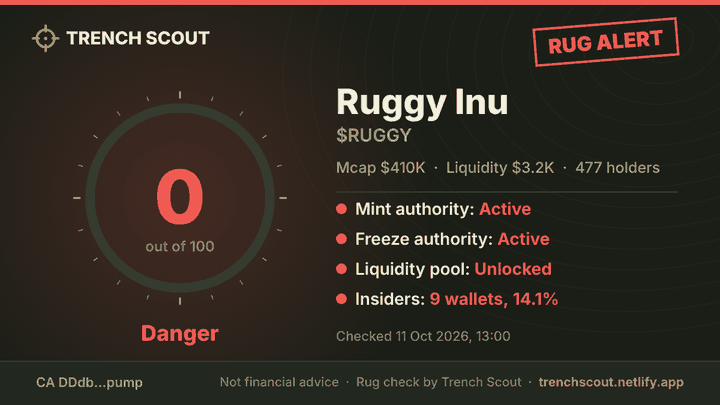
One click puts a clean picture of the check on your clipboard, ready to paste on X or in a Telegram group. Rugs get a RUG ALERT stamp.

Safety

It never touches your wallet.

Wallet drainers hide in browser extensions, so here is the complete list of what Trench Scout can do. It has no wallet permission, runs only on coin pages of six trading sites, and talks to three data services.

What it does

  • Reads coin addresses from the pageOn Padre, pump.fun, DexScreener, Axiom, Photon and BullX: the coin you opened, and the coins in the list on your screen.
  • Asks RugCheck, DexScreener and Jupiter about those coinsPublic data, and a price quote for the sell test. Your browser asks them directly.
  • Confirms your Pro key with GumroadOnly if you bought there, about once a week.
  • Remembers your plan, today's checks, your watchlist and blocklistKept in your browser, never sent anywhere.

What it never does

  • Connect to your wallet or ask you to sign
  • Buy, sell or move your coinsThe sell test is only a price quote. Nothing is ever traded.
  • Ask for your seed phrase or private keys
  • Read other websites or your browsing history
  • Track you, show ads or sell data
Everything it asks Chrome for
storageRemembers your plan, your key, today's free checks, your watchlist and blocklist, and the numbers from your recent checks.
alarmsChecks the coins on your rug alarm again every few minutes (Pro).
notificationsShows the rug alarm's desktop alerts.
activeTabReads the address of the open tab, only when you click the toolbar icon.
trade.padre.gg
pump.fun
dexscreener.com
axiom.trade
photon-sol.tinyastro.io
neo.bullx.io
Shows the panel on coin pages. Nothing else on these sites is read or changed.
api.rugcheck.xyz
api.dexscreener.com
Fetch public data about the coin you open.
api.gumroad.comConfirms Pro license keys.

Proof

Don't trust us. Check us.

Crypto is full of paid shills and made-up reviews, so we post neither. Every review here links to the trader's own post, and everything else on this page you can check for yourself.

The rules are public

Every check and every point it can cost is on the scoring sheet, and the panel lists each deduction for the coin in front of you.

Read the scoring sheet

Every number has a source

Each check links to the same coin on RugCheck, DexScreener and Solscan, so you can open the raw data and compare.

See the links in the demo

No wallet access, and you can see it

Chrome shows every permission an extension has under Details. Ours match the list on this page, and none of them can touch a wallet.

See the permissions

7-day refund, no questions

Checkout and receipts run through Gumroad. Sold by TrenchScouts, Lithuania. Reach us any time: X or email.

Read the refund policy

How we handle reviews: we only show reviews from people who used Trench Scout, with their permission and a link to the original post. We never pay for reviews or write them ourselves, and we don't change what people said.

Pricing

Free to start. Pro when you trade all day.

Start with 5 free checks a day, one click each. Pro checks every coin the moment you open it, with no limit. Most bad apes cost more than a month of Pro.

Free

To try it on a few coins

$0

  • 5 coin checks a day, one click each
  • Score, verdict and every check, with the sell test
  • Scores on the first 3 coins of each list
  • Toolbar checks, image cards and Share
  • No account, no card
Add to Chrome

No time limit

Pro Monthly

For trading most days

$9a month

  • Unlimited checks
  • Every coin checked the moment you open it
  • A score on every coin in the trenches and on pump.fun
  • Rug alarm, live exit quotes, dev track record
  • Cancel anytime in Gumroad
Get Pro Monthly

Billed monthly through Gumroad

Founders price

Pro Lifetime

Pay once, keep it

$29Regular price $49once

  • Everything in Monthly, no renewals
  • Every future update
  • One key, up to 3 browsers
  • $29 for the first 100 buyers, then $49
Get Lifetime

One payment through Gumroad

How your Pro key gets into the extension

  1. 01Buy on Gumroad

    Pay by card or PayPal. It takes about a minute, and Gumroad handles the payment, so we never see your card.

  2. 02Get your key right away

    Your license key is on the page you see after paying and in the receipt Gumroad emails you, seconds later.

  3. 03Paste it. Pro is on.

    Click the Trench Scout icon, then Account. Paste the key and press Activate. Pro unlocks instantly, on up to 3 browsers.

Pay by card or PayPal through Gumroad. Prices are in US dollars; Gumroad adds VAT where it applies. Full refund within 7 days, no questions asked. Pay in SOL or USDC instead.

Pay with crypto

Pay in SOL or USDC.

Same price as the card plans. Pay from your own wallet; we check the transaction on Solscan and send your key.

  1. Pay from your wallet

    Pick your plan, then scan the QR code with Phantom, Solflare or any Solana wallet. The amount fills in for you. Or send it to the address by hand.

    Pro Lifetime: 29 USDC (founders price) Pro for 30 days: 9 USDC Or the same dollar value in SOL at the time you send.

  2. Send us the transaction

    Paste your transaction link into the form. It writes the message for you; send it to one of our contacts.

  3. Get your key

    We reply within 12 hours, usually much sooner. Paste the key in Trench Scout under Account and Pro starts straight away.

Pay

Solana network

Sales wallet address

The sales wallet address appears here.

  • Solana network only. After you paste the address, check its first and last four characters.
  • We never DM you first and never send a different address. Anyone who does is not us.

Send us the transaction

Send it to: your Telegram, X or email

Questions

Before you install.

Can Trench Scout touch my wallet?

No. It has no wallet permission and never asks you to connect, sign or approve anything. It reads coin addresses from the page and asks RugCheck and DexScreener for public data about those coins, and Jupiter for a price quote. The sell test is only a quote: nothing is ever bought or sold.

Does a high score mean the coin is safe?

No. A high score means the common rug setups aren't there: authorities are revoked, liquidity is locked and supply isn't stacked in a few wallets. A dev can still sell, and some scams use tricks no public data shows. Size your trades with that in mind.

Where does the data come from?

RugCheck supplies authorities, holders, insider wallets, LP locks, token powers and its own risk flags. DexScreener supplies price, liquidity, volume, age and socials. Jupiter, the router most Solana apps trade through, supplies the sell test's live quotes. Your browser asks them directly, so there is no Trench Scout server in between.

What does the free plan include?

5 checks a day. Open a coin and press Check this coin: a check is used only when you press it, and a coin you already checked today opens for free. You get the score, the verdict and every check, including the sell test, plus scores on the first 3 coins of each list. When the 5 are used, they come back at midnight on your computer's clock. Pro checks every coin the moment you open it, with no limit, scores every coin in the trenches, and adds the rug alarm, what changed since your last check, the exit check, the dev's track record, the full score breakdown and RugCheck's flags.

What is the sell test?

Every check asks Jupiter, the router most Solana apps trade through, what selling $500 of the coin would get you right now, across every pool. If selling would knock 15% or more off the price you get, it warns you. If the coin can be bought but not sold, the classic honeypot, it's a critical red flag. It's only a quote: no wallet, no signature, nothing is traded.

How do the scores on coin lists work?

On Padre's trenches, pump.fun's board and DexScreener's lists, each coin on your screen gets a small score on its picture: green, amber, orange or red, NEW while its holders aren't listed yet, RUG for a rugged coin, DEV for a dev you blocked. Point at a score for the details. Coins are checked one at a time, only while the tab is open in front, and they never use your free checks. Pro scores every coin; the free plan scores the first 3 on each list.

How does the rug alarm work?

With Pro, press Watch on a coin. Trench Scout checks it again about every 3 minutes, for up to 7 days and up to 15 coins at once, and sends a desktop alert if the liquidity halves, the dev sells, mint or freeze authority switches on, the score drops 20 points or more, or the market cap falls 60%. The checks run in your browser, so Chrome has to be open.

Does it work on coins launched seconds ago?

Yes. Open a coin straight from Padre's trenches or pump.fun and you get an early check within seconds: mint and freeze authority, hidden token powers and the bonding curve, with clear red flags shown at once. The score appears as soon as RugCheck lists the holders, and the panel fills itself in as the data arrives, usually within a minute or two.

Which sites does it work on?

The panel shows up on coin pages on Padre, pump.fun, DexScreener, Axiom, Photon and BullX. Anywhere else, click the toolbar icon and paste a contract address or a coin link from Birdeye, Solscan or GMGN.

Can I share a check?

Yes. Press Share in the panel and paste the summary into Telegram, Discord or X: the score, the red flags and the contract address, ready to send.

Does it work on my phone?

Not yet. Trench Scout is a Chrome extension for laptops and desktops. On your phone, send yourself the link, or buy Pro now and activate the key on your computer later.

How do I activate Pro?

Buy on Gumroad and your license key appears straight away, on the page after you pay and in your receipt email (or we send it after a crypto payment). Then click the Trench Scout icon in Chrome, open Account, paste the key and press Activate. Pro starts instantly, no account or password needed.

I lost my key. What now?

Search your email for the Gumroad receipt: the key is in it. If you can't find it, email us from the address you paid with and we'll send it again.

How many browsers can I use?

One key works on up to 3 browsers. If you need it on a new computer after that, message us and we'll sort it out.

Which browsers does it run in?

Chrome, Brave, Edge and other browsers built on Chromium, on desktop. Not Firefox, Safari or phones yet.

Can I get a refund?

Yes. Full refund within 7 days of purchase, no questions asked. Crypto payments go back to the address they came from, minus the network fee. Trading losses are never refunded.

Why not just use RugCheck's website?

You can, and it's free. Trench Scout saves the copy and paste: it reads RugCheck and DexScreener for you right on the coin page, turns a page of numbers into one score, and shows the checks behind it on the same card. It also scores every coin in the trenches before you click, and tests whether you could actually sell. Pro keeps watching the coins you hold and alerts you, and shows what changed since you last looked.

Is there a Trench Scout token?

No, and there never will be. Anyone selling or airdropping a “Trench Scout” token is running a scam. Pro is sold only through this website.

Is Trench Scout part of Padre or pump.fun?

No. It's an independent tool that works on those sites, and it isn't affiliated with Padre, pump.fun, DexScreener, Axiom, Photon, BullX or RugCheck.
Check your next coin before you buy it.

Free to install. 5 checks a day, no wallet connection, no sign-up.

Get it on your computer

Trench Scout is a Chrome extension, so it installs on a laptop or desktop, not a phone. Send yourself the link and open it there. It takes a minute.

Email it to myself

Want Pro? You can buy it on your phone now. The key arrives by email; paste it on your computer later.

Get Lifetime